
The May 2024 releases of Dentrix include these features:
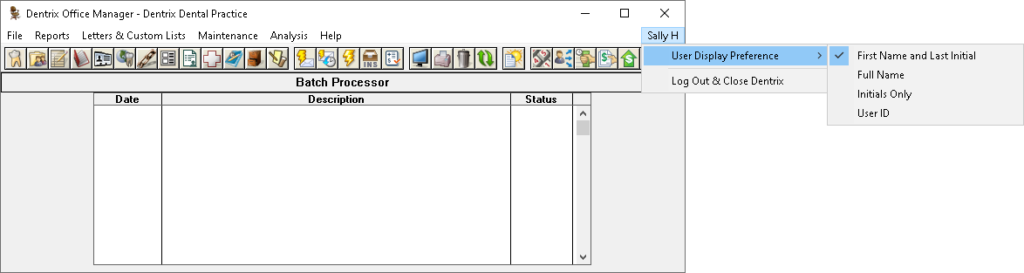
Logged in User Display (24.9)
You can now choose how your logged in username appears. The default option will be set to “Frist Name and Last Initial.”
Miscellaneous Features
The Practice Definitions dialog box was modified from displaying seven rows of definition types to displaying 18 rows. For more information, please refer to Customizing practice definitions in the Dentrix Help. (24.10)
The Insurance Information dialog box was modified so that when you click the Subscriber additional information icon, the selected subscriber in the Subscriber list is selected by default in the Select Primary Subscriber (Insured Party) dialog box. (24.10)
The Insurance Information dialog box was modified so that you cannot change the selected insurance carrier by typing a name in the Carrier field. You must select a new carrier from the Select Primary Dental Insurance Plan or Select Secondary Dental Insurance Plan dialog boxes. (24.10)
The Insurance Information dialog box was modified so that when you select the New Insurance Plan option in the Subscriber list, the Subscriber ID # field is cleared. For more information, please refer to Assigning insurance to subscribers in the Dentrix Help. (24.10)
When creating or editing Appointment Book Views, the title bar of the dialog box has been changed to “Setup View.” The window title previously shared the same name as another window, creating confusion when referencing the correct dialog box. For more information, please refer to Editing [Appointment Book] Views in the Dentrix Help. (24.9)
Bug Fixes
When entering a payment, extra spaces entered before or after the Check Number and Bank Number will now be removed. (24.9)
When working with dental diagnostic cross coding setup, decreased the delay when loading dental diagnostic code lists. (24.9)
In Dentrix Reports, the Export option available when right-clicking a report was misidentifying the type of file that the “Provider Aging Report (data)” option would export to. The menu option was changed to simply read “Export” instead of specifying an incorrect file type. (24.9)
Updated the help icon in the Enter Batch Insurance Payment window. (24.9)
In some circumstances, Purge Exported Files did not identify certain files that could be deleted. (24.9)
Corrected the Claims Manager so that it no longer malfunctions when working with carriers identified as “Insurance Record Not Found” (typically these are purged insurance plans). (24.9)
The Close Transactions task (part of month end) better responds to situations when it encounters procedures that missing provider information or are assigned corrupted provider information. (24.9)
In some situations, the Dentrix Chat with Support feature was becoming confused between the customers serial number and customer number. (24.9)
Made corrections to the behind-the-scenes processes Dentrix uses to calculate aging of offsetting adjustments. (24.9)
Improved handling of rolling back the database version if an installation fails. (24.9)
Corrected an issue discovered in Health History where the Preferred Pharmacy was inserting the phone number into the fax number, when the fax number was already blank. (24.9)
Corrected an issue where some menu items would disappear from the Office Manager after disabling passwords. (24.9)
In Help > About Dentrix, the Active Directory Utility was incorrectly displaying an underscore character in front of the common name. (24.10)
The New Patient report now prints or exports the grand totals graphic. (24.10)
Error messages for the RCM Dashboard was incorrectly identifying the product as QuickBill. (24.10)
When a Medical Insurance Payment is processed through Insurance Pay in the Batch Insurance Payment dialog, the receipt now correctly goes to the Document Center. (24.10)
Removed the blank button that appeared on many user’s Appointment Book toolbars after the Signature Manager was introduced. (24.10)
Added transparency to the Help icon within Dentrix Reports. (24.10)
In the QuickStart menus, an option was removed that was linking to an outdated website. (24.10)
Vertically centered the claim notes column in the Claims Manager. (24.10)
Aligned the Insurance Notes and Plan Details buttons displayed in the Family File. (24.10)
Clarified the warning message when changing a family member’s home phone number. (24.10)
The warning message now correctly appears again when creating an appointment for a Non-Patient. (24.10)
Corrected the default choice of relation to subscriber when selecting an insurance subscriber outside of the family or from the “Choose one of the existing family plans” window. (24.10)
The Appointment Book was displaying a green “E” instead of the health history icon when the Appointment Book display font size was 12. (24.10)
Resolved a problem that was preventing the proper database conversion from Dentrix versions G7.5 to 24.7 to the current version. (24.10)
Resolved a problem where Smart Image was not recognizing valid licenses for Dentrix Imaging Center. (24.10)
If the connection to the Dentrix server is interrupted, Dentrix Appointment Book will no longer display “error 127” every 15 seconds. (24.10)
Within Insurance Claim Information, restricted the allowed input in the Prothesis Prior Date field to help prevent failed claim validations. (24.10)
Changed the validation of non-electronic attachment control number to conform with electronic claim submission requirements. (24.10)
Corrected a punctuation error in the Dentrix Setup Wizard, Workstation Settings window. (24.10)
Introduced better handling of patient ID numbers when upgrading Dentrix database versions. (24.10)
Introduced better handling of insurance id numbers to prevent errors when assigning insurance plans to family members. (24.10)
Corrected a spelling error in the eDex Category Setup dialog box. (24.10)
Resolved an issue that was causing performance slow down for some users in the Family File. (24.10)
Resolved an error that prevented chart opening when the provider’s last name was missing or ended with a blank space. (24.10)
View the Release Guide.
These versions of Dentrix were known as Dentrix 24.9 and 24.10.
